Cashwerk Review - Smart Invoicing and Business Tools for Freelancers and Creators
There's a quiet, recurring dread that comes with working for yourself. You finish the project, send the invoice, and then... you wait. Weeks pass. You check your bank account. Nothing. You fire off a polite reminder, then another, and somewhere in the middle of that waiting game you realize you've become not just a freelancer but also an unpaid collections agent.
The invoice workflow—tracking who's paid, who hasn't, following up, keeping records straight for tax season—is a hidden second job. Most freelancers and creators don't lack talent or clients. They lack a clean, organized system for getting paid.
The Money Management Gap in the Creator Economy
Ask a room full of freelancers about their finances and you'll get a familiar set of complaints:
- Invoices live in email threads and PDFs scattered everywhere, so you can never see your true financial picture at a glance.
- Chasing payments eats hours every month, and each reminder feels awkward to send.
- No centralized view of what's owed and what's coming in, which makes planning impossible.
- Manual data entry for taxes and bookkeeping is repetitive and error-prone.
- Too many tools for different financial tasks, none of which talk to each other.
Cashwerk is built to collapse all of that into one place. It's not just another invoice generator. It's a business management system designed specifically for the way freelancers, creators, and solopreneurs actually work.
What Cashwerk Actually Does
At its core, Cashwerk combines three things most solopreneurs need but rarely find in one tool: professional invoicing, business analytics, and practical money management features. The result is a single dashboard where you can see, chase, and understand your money.
Smart Invoicing That Gets You Paid Faster
The invoicing side is where Cashwerk shines. It's not just about making an invoice look good (though it does that too). It's about the entire payment lifecycle.
- 🧾 Professional invoice templates that reflect your brand without requiring design skills.
- 🔄 Recurring billing for retainer clients so you never forget to send a monthly invoice.
- 📊 Invoice status tracking so you always know what's paid, pending, or overdue.
- ⏰ Automatic payment reminders that chase late invoices for you, politely.
- 🌍 Multi-currency support for working with international clients.
- 💳 Multiple payment options so clients can pay the way they prefer.
The automatic reminders are the quiet hero here. Instead of dreading the awkward "just following up" email, you set the cadence once and Cashwerk handles the follow-up sequence. Clients who owe you money hear from your invoicing system, not from you—which preserves the relationship while getting you paid.
Business Analytics That Make Sense
Beyond invoicing, Cashwerk gives you a dashboard that turns scattered financial data into clear insight:
- Revenue tracking over time so you can spot seasonal patterns.
- Outstanding balance views that show exactly how much cash is stuck in unpaid invoices.
- Client payment history to see who pays on time and who needs a nudge.
- Invoice performance metrics that reveal which projects or services generate the most income.
For a freelancer, this kind of visibility is transformative. Instead of guessing how the business is doing, you see it. Instead of being surprised by a slow month, you can predict it and plan accordingly.
Money Management for the Self-Employed
Cashwerk rounds out the toolkit with features that address the practical realities of self-employment:
- Expense tracking so tax time isn't a scramble through bank statements.
- Cash flow visibility that shows money in, money out, and what's actually available.
- Financial organization tools that keep business finances separate and clean.
- Tax-ready reporting that simplifies the quarterly and annual paperwork.
A Dashboard Built for Clarity
The user experience is deliberately simple. When you log in, you see your financial situation at a glance: total invoiced, total paid, outstanding balances, and recent activity. There's no thirty-minute learning curve, no buried settings. It's designed so that the first time you use it, you understand it.
The invoice editor follows the same philosophy. Pick a template, add your services, set a rate, and you're done. Customizing with your logo and colors is straightforward, so every invoice you send reinforces your brand rather than looking like a generic form.
Getting Started Takes Minutes
Cashwerk understands that a freelancer's time is billable. Setup is fast:
- Create your account and add your business details.
- Customize your invoice template with your logo and branding.
- Add a client and create your first invoice.
- Send it and let Cashwerk handle the tracking and reminders.
Most users report being fully set up and sending their first branded invoice within a single session.
Pricing That Respects Your Cash Flow
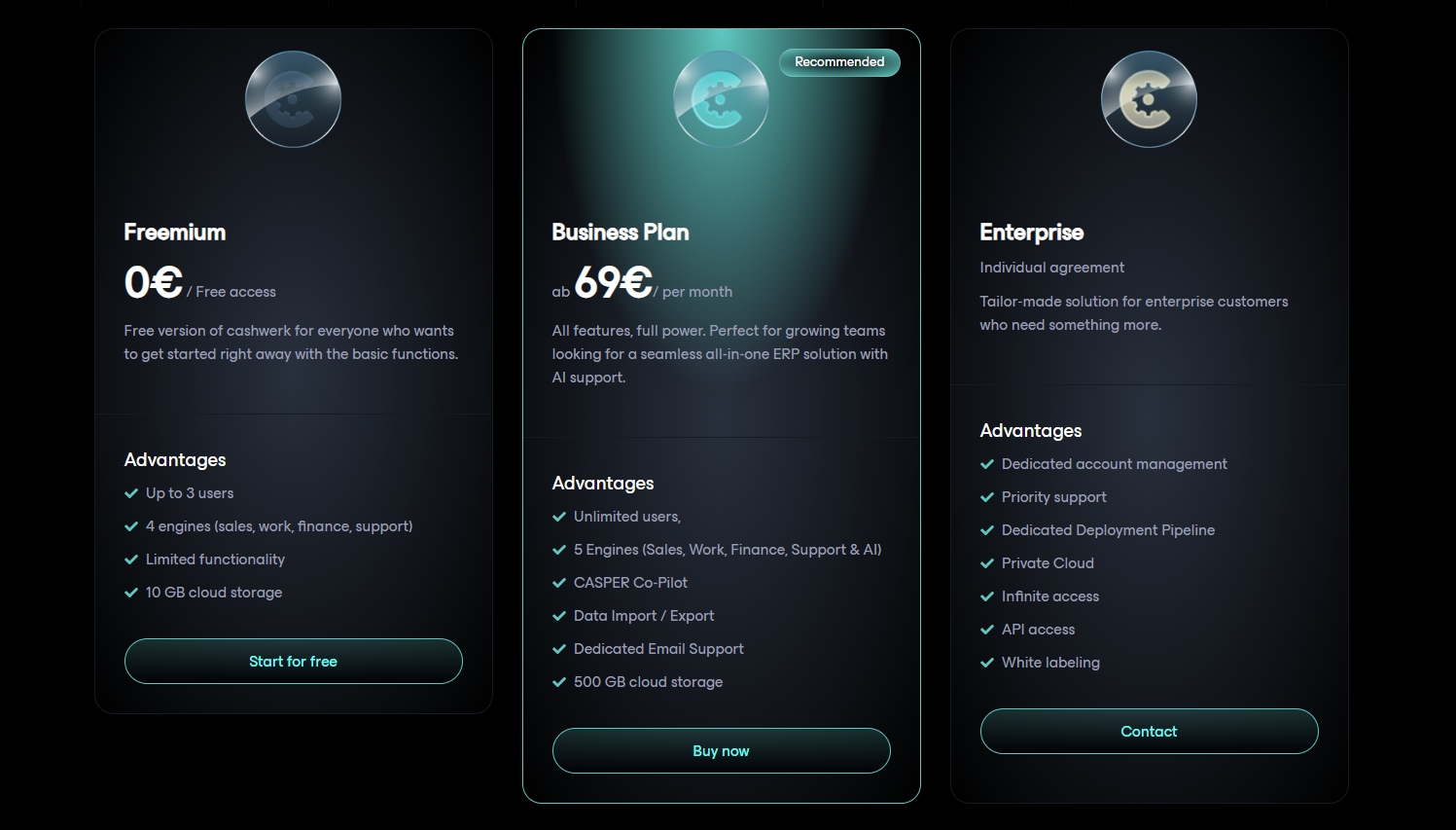
Cashwerk's pricing is designed for freelancers who are cautious about recurring subscriptions:
- Free Plan: Send unlimited invoices, track payments, and access essential features with no monthly cost. Perfect for getting started or occasional billing.
- Paid Tiers: Unlock advanced features like recurring billing, automatic payment reminders, multi-currency support, detailed analytics, and priority support at an affordable monthly rate.
The free tier isn't a crippled trial—it's genuinely useful for freelancers who send a handful of invoices a month. For those with steady client volume, the paid tier pays for itself the first time it chases a late invoice you'd otherwise have to chase yourself.
Who Should Use Cashwerk?
- Freelancers juggling multiple clients who need a reliable system for invoicing and payment tracking.
- Creators and independent professionals who want to look professional without hiring an accountant or designer.
- Solopreneurs running a small business who need business analytics to make informed decisions.
- Consultants and coaches with recurring retainers who benefit from automated recurring billing.
- Anyone self-employed who's tired of spreadsheet chaos and wants one clean place for business money.
Cashwerk in Context
| Feature | Cashwerk | Traditional Accounting Software |
|---|---|---|
| Ease of Setup | Minutes | Days of configuration |
| Invoice Templates | Modern, customizable | Often dated and rigid |
| Automatic Payment Reminders | ✅ Built-in | ❌ Usually missing |
| Recurring Billing | ✅ Easy | ✅ Possible but clunky |
| Business Analytics | ✅ Visual dashboard | ❌ Reports buried |
| Built for Freelancers | ✅ Yes | ❌ Made for larger teams |
| Learning Curve | ✅ Minimal | ❌ Steep |
| Pricing | ✅ Freelancer-friendly | ❌ Enterprise-oriented |
Traditional accounting software was built for finance departments, not independent professionals. Cashwerk flips that: it's built for the person wearing every hat at once—CEO, accountant, and marketer.
The Bottom Line
Cashwerk addresses a real problem for freelancers and creators: the unpaid administrative work that eats into the time you should be spending on client work. By combining smart invoicing, automatic payment chasing, and clear business analytics into a single, easy-to-use dashboard, it gives independent professionals the financial clarity and control they've been missing.
Whether you're a freelancer sending your first invoice or a creator with a growing roster of clients, Cashwerk removes the friction from getting paid. And in the world of self-employment, that's worth more than the monthly fee.
Stop chasing payments and start getting paid on time.
👉 Start for Free — Create branded invoices and manage your freelance business finances from one dashboard.
Tags
# Review# Cashwerk# invoicing software# invoice software# freelance invoice# invoicing for freelancers# business management tools# business management# freelance business management# invoice maker# invoice generator# free invoicing software# billing software# professional invoice template# freelancer financial tools# financial management for freelancers# creator economy tools# business dashboard# business analytics# invoice tracking# payment reminders# online invoicing# small business invoice# self-employed invoice# freelancer money management# project invoicing# recurring billing# payment tracking# cash flow management# invoice design tool# freelance finance app# creator billing# invoicing solution# smart invoicing# business finance tools# freelancer toolsCoaching Portal Review - Turn Expertise Into a Profitable Online Coaching Business
BoxWatch Review - All-in-One Server Monitoring That Replaces Four Separate Tools
Follow for new blogs
Subscribe to our blog
Subscribe to Newsletter
Subscribe to our newsletter to get the best products weekly.